AE Link: Lightwave to After Effects export
Need to export Lightwave cameras, lights and nulls to After Effects projects? AE Link is the pixel-perfect “one click” solution that just works.

Lightwave to After Effects in one click
AE Link is a Lightwave plugin that makes a breeze of exporting Cameras, Nulls, Lights and rendered sequences from Lightwave to After Effects.
You don't even have to import anything into After Effects. The innovative, non destructive, workflow ensures that what you do in Lightwave is mirrored in After Effects. Even complex scenes update in near real time.
"So glad we found this. It worked great on a PC, Lightwave 10.1 and
After Effects CS5. It will be a life saver."
Art Holden, Presenter Media Inc.
Key Features and Benefits — It would be hard to make it easier
- Current AE Link version works with Lightwave 11.0.3 and higher but not including Lightwave 2018 as well as all After Effects releases from 7 Professional to CS3-CS6 and all CC releases up to CC2014. It fully supports Lightwave's dongle-less licensing system. Tested both on Windows and MacOS. Please note that Auto Sync does not work properly on OSX Mountain Lion (or higher OSX version) regardless of AE / LW versions. Everything else works properly on all platforms and software releases.
- Save time and deliver on time — Keep changing your Lightwave animations and see them update in After Effects with just one click. No need to bake anything, unless you are using IK or some motion modifiers.
- Reliable export — Name it: Hierarchies? Yes. Non-square pixels? Yes. Camera's focal length changes? Yes. AE Link is a battle-proven tool we used in countless productions. Its quaternion-based coordinate system converter ensures pixel perfect matches no matter how complex movements and orientations are.
- Simple workflow — Spend more time creating, and no time copying, pasting or looking for files. With AE Link's non-destructive workflow Lightwave talks to After Effects, that's why there are only two buttons: Sync Scene and Sync Selected. By their names you already know how to use AE Link. It would be hard to make it easier.
- Advanced features — AE Link's custom objects allow you to decide how Lightwave objects will appear in After Effects: as nulls, solids, or text layers. With or without motion blur. You can even use the motion from non-deforming object's vertices and turn all of them into solid or text layers. But, wait, for this to work you'll need two clicks.
System Requirements, Licensing and Details
- Macintosh: Lightwave 3D 9.6.1 or higher. Cocoa plugin, works both in 32 and 64 bit. (Automatic Sync dos not work in Mountain Lion or higher, use Run Script instead.)
- Windows: Lightwave 3D 9.6 or higher. Both 32 and 64 bit versions are provided.
- Works with: After Effects 7 Pro, CS3, CS4, CS5, CS 5.5, CS6 and all CC releases
- Licensing: AE Link licenses are tied to Lightwave's hardware lock id (aka dongle) or the new software lock id available in Lightwave 11.0.3 and higher up to 2015.x (not 2018). You'll be required to enter your lock id after purchase. Support article: how to generate licenses
- Volume discounts and studio licenses: discounts are available and custom licensing can be arranged — see the "In-Depth" tab for more informations.
- Details: AE Link is delivered as digital download only. Tech support is handled by our online trouble ticket system. Minor version upgrades are always free.
Workflow videos available in the "In-Depth" tab
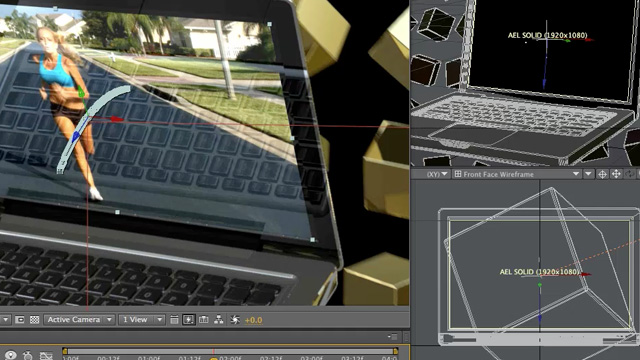
Watch the videos in the "In-Depth" tab above. The longer video showcases the custom objects' workflow.
Custom objects allows to create and edit After Effects layers inside Lightwave.
Other videos are available, showing the pixel perfect matching, basic workflow and quick start.
To purchase AE Link use the Buy Now button below. The entire purchase and licensing system is automated, so you are just a minute away from using AE Link.
AELink Lightwave to After Effects Plugin Premium Content
This product includes: AELink plugin for Lightwave 3D, licensed for both MacOS and Windows. System requirements: Lightwave 9.6.1 or higher upto 2015.3 under MacOS; Lighwave 9.6 or higher upto 2015.3 under Windows. After Effects 7 Pro up to CC2014. (MAC only: Automatic Sync does not work on OSX Mountain Lion or higher, Manual Sync has no issues.) License is tied to a single Lightwave's product ID and a valid product ID is required (either software or hardware).
Price: € 115 (approx 135 USD) (VAT excluded) — VAT is not charged outside European Union
Need render or not ?
Posted by Guest
Didn't need Rendering in Lightwave before sync to AfterEffect?
Plug-in AE_Sync_Scene failed to start? Help!
Posted by Kenny on Aug 5th, 2011
Hi,
I'm very excited to use this plug-in. Unfortunately I am getting an error in lightwave (plugin AE_Sync_Scene) and (Sync_Selected) failed to start. I am using After Effects ver 5 with a current update.
Please reply ASAP.
Hi,
sorry to hear that, a new version of AE Link mac is available that fixes a few compatibility issues and adds support for 9.6.1. I also wrote you an email in case you are not on Mac.
Thanks for choosing AE Link!
Max
It's Working!!!!
Thanks for your quick reply. I have the plugin working now.
Thanks
Ken R.
AE Link motion limitations?
Posted by Guest on Sep 23rd, 2011
Hi there! Very much interested in this but would like to know what is not supported by the plugin? I assume it supports both free and targeted camera (camera looks at target in LW). Does it support complex parenting of cameras, IE (camera parented to null, null is animated to drive camera motion etc). Does it support motion modifiers such as having the camera match orientation of another object, relativity, expressions, follower and the "same as object" rotation options?
Thanks so much, really looking forward to getting this!
Re: AE Link motion limitations?
Posted by Max on Sep 28th, 2011
Hello and sorry for the delay.
modifiers applied in Graph editor all work in real time without
problems. The only limitation is with "After IK" motion modifiers.
"After IK" modifiers (and tools able to work after IK
such as relativity) require baking.
AE Link can't see IK nor anything that is applied "per frame" unless it scans the entire animation.
The next version will have an option to scan the animation (without
having to bake anything) and it will allow to see those pesky After IK
modifiers stepping frame by frame. But it won't be as fast as the
default method that does no scanning.
Yes, AE Link v1.1 added a compatibility mode for a
free script that allows to export AE data to LW. It was requested by an
early adopter of AE Link in NewTek's forums thread, and it's an handy
addition. Not seamless, but works well and it's pixel perfect.
Full bi-directional functionality is planned, but most users said
they would have preferred a simple integrated pass manager to be
implemented first. So bidirectional exchange is going to be added... but
there is no time frame yet (v1.2 with pass management is scheduled for
late october).
Thanks for your comment!
Lightwave 10.1 OSX compatibility?
Posted by Guest on Sep 26th, 2011
Does AE Link have Lightwave 10.1 OSX comparability?
Re: Lightwave 10.1 OSX compatibility?
Posted by Max on Sep 28th, 2011
Hi,
yes, sure, Mac is supported both in 32 and 64 bit and AE Link is 100% compatible with Lightwave 10.1.
Actually I develop on Mac then port to Windows.
Thanks for your question!
Works great with LW 10.1!
Posted by Guest on Oct 13th, 2011
So glad we found this. It worked great installed on a PC with Lightwave 10.1 and After Effects CS5. It will be a life saver.
Its amazing
Posted by Guest on Nov 11th, 2011
So I ended up buying this for an upcoming project just a couple of days ago and I did a first run with it today. This is simply amazing, you have saved me hours of work, but more importantly opened doors to much more creative options, ones i didn't want to explore before due to the slow nature of matching up motions. It makes it feel like AE and LW are now one program. Thank you!
Hey thank you. Glad it's useful.
Max
Installing AE Link
Posted by Kirkeric on Dec 1st, 2011
Hello,
Just bought this and while the install seems it should be a snap, when I install it, it does not create this cfg file and so I can not import the branch.
When I add the plugins, it does it, says 6 plugins have been added. Can't get past that.
Appreciate some help.
Eric
Re: Installing AE Link
Posted by Max on Dec 1st, 2011
Hi,
sorry for the problem and thanks for choosing AE Link.
The menu config is a separate download ( http://www.vfxwizard.com/downloads/aelink-menu-cfg.zip). I'm also going to email it to you.
This should fix the issue, if you have any other problems or if I misunderstood the issue please let me know.
Registered Users: if you need tech support, please use the ticket system in your Dashboard, it has the highest priority.
Bi directional sync?
Posted by Max on Jan 28th, 2012
AE Link sounds like an amazing plug-in.
Does AE Link allow for bi directional syncing of scenes from AE to/from LW? We current use Camera Tracker (The Foundry) to for match-moving. We typically track in AE and then send the data to LW vby jumping through a few hoops. After seeing a few YouTube videos on AELink, I was wondering if we could use your product to make this process easiest. Here is what I would be tring to do wit it.
1. We would use Camera Tracker in AE to generate a 3D match-move solution (3d scene)
2. We would then use AELink to send the 3D scene to LightWave where we would add 3D geometry/ etc and render 3d elements for our composite.
Thanks
Carlos
Re: Bi directional sync?
Posted by Max on Mar 26th, 2012
Carlos,
I'm very sorry but somehow your comment was published and I wasn't notified. Nor could I find your email, so I can't reply.
Just in case you read this, bi directional sync is coming. I don't have first hand experience with The Foundry's tracker, but it should work even with the free AE to LW script.
Sorry again for missing your comment!
Max
Brilliant plugin!
Posted by Guest on Mar 23rd, 2012
Just purchased this - and it works brilliantly. I wanted to thank you for making such an awesome piece of software - great work guys! But I also echo others when I say that bidirectional linking would make it so much more useful. Even if it's not a "live" link - one way only to either app - it would be so useful for my FX work if I could send camera data from AE to LW as easily as I can the other way around!
Re: Brilliant plugin!
Posted by Max on Mar 26th, 2012
Hi Dan,
glad you like it.
Currently you can make use of the free script available from aenhancers (AE Link has a compatibility setting for that script).
Bidirectional sync is already in next version, but it won't be as seamless as going from LW to AE is. There's no standard way to control LW from AE, while the reverse is true.
Thanks for your kind words!
Max
A bug!
Posted by Guest on Apr 4th, 2012
Hi there, I've just noticed that if your LW scene is set to only render a single frame in your sequence, the AE script fails and usually crashes After Effects. Something to fix in the next release maybe?
Re: A bug!
Posted by Max on Apr 5th, 2012
Hi,
thanks for reporting this.
I wasn't able to crash After Effects this way, but using 1 frame long exports I got the warning. Makes sense as AE Link uses a workaround to open AE comps from scripts, creating a very short preview.
It's an easy fix, again thanks for reporting it!
Max
Lost Link?
Posted by Lucash on Aug 13th, 2012
Hi!
I've got a problem with AE Link.
Plugin lost connection between LW and AE. I think after upgrading my OSX 10.7 to 10.8. When i try to "sync scene" or "sync selected" nothing happing. No errors. AE Link config untouched.
I use LW 11.0 with AE CS 5.5.
Please Reply
Re: Lost Link?
Posted by Max on Aug 13th, 2012
Hi,
if this happened after upgrading to Mountain Lion, it's likely to be due to the "sandboxing" that Apple has imposed to apps and cuts out the ability to communicate between them.
The quick fix, for now, is to go to AE Link's config and set Export Method to "Manual", then use Run Script from AE.
BTW, from your Dashboard you have access to the Trouble Ticket system for tech support: it's way faster than comments.
Thanks for your report!
Max
Re: Lost Link?
Posted by Lucash on Aug 13th, 2012
"Manual method" working fine!
Thanks for your reply.
sync messes with other comps
Posted by Guest on Sep 13th, 2012
Hi,
Great program. I use it all the time now, but I do have a problem that occurs if I've sent some stuff from Lightwave to after effects, then try to sync a completely different scene in lightwave. Any previous comps in AE that have synced elements get messed with. Nulls disappear, camera information is rewritten, etc. Since this is a completely different scene, different render, etc. I'd think that it should only touch the new comp it's creating for that render. I'm using v 1.10 64bit PC, sending to either CS5 or CS6.
Thanks,
-Rich
Re: sync messes with other comps
Posted by Max on Sep 13th, 2012
Hi,
there can be only one scene synced at a time (in the current version).
AE Link does some filtering to create a single null (the AE LINK MASTER NULL) in the solids folder, regardless of how many nulls are in the scene. This helps a lot when you have many nulls (such as in a 3D tracked shot).
The workaround I suggest is to rename the masternull after you have synchronized the first scene, this breaks the connection and you can sync the second scene.
AE Link 2 (that was delayed due to some unexpected issues) addresses this limitation allowing to sync as many scenes as you want at the same time (with slightly reduced performance).
Thanks for your kind words and for the report!
Max
Compatibility
Posted by Guest on Nov 11th, 2012
Hi, AE Link looks amazing!!!
I have two questions:
-About compatibility, my After is CS6, my LW 11.0, and my Mac OSX 10.8.2. Is there a problem with mountain lion?
-I'd like to use the final AfterFX projects in other machines, like a template. Will be needed the plugin installed there too, and/or LW? Or the project freeze/create the keys, like a light bake???
Thanks,
Pedro Jafet
Re: Compatibility
Posted by Max on Nov 13th, 2012
Hi,
right now there is an issue that only affects Macs with Mountain Lion. AE Link works properly but Mountain Lion prevents the Lightwave app from talking to After Effects via AppleScript (this is a Mountain Lion security measure).
I'm currently working on a fix, but meanwhile the autosync is not working on ML Macs and requires manual sync (import .jsx file with Run Script). Every other Mac OS version (and PCs, of course) work without problems.
As for the baking, you are correct: once a project has been synced it's baked data. You can move it around as much as you want.
Thanks for your kind words!
Max
AE link in Mountain Lion
Posted by Liberty3D_79 on Nov 21st, 2012
Hi,
i just recently switched to AE 6 and since that the program does not seem to work anymore, i can install the branch and everything but the buttons do not react, is there a way to get this plugin running under mountain lion?
Thanks for your reply, i really need to get this working again, its such a great tool i dont want to miss in my workflow anymore, thanks in advance.
Martin
Re: AE link in Mountain Lion
Posted by Max on Nov 21st, 2012
Hi,
it's not After Effects CS6, it's Mountain Lion.
Please see the above comments - right now (on Mountain Lion only) automatic sync is not possible because OSX prevents apps from talking via applescript.
You have to use the manual "run script" method, until I am able to provide a workaround, sorry.
Max
Registered Users, please use the ticket system in your Dashboard for tech support, it has the highest priority.
Issues with Null staying attached
Posted by Guest on Nov 30th, 2012
Hey There. I love this plugin, but I am running into an issue where I have a null attached to the end of a letter, and in Lightwave the null stays fine, but when I bring it into AE, it looks right at the beginning, but when it gets close to it it becomes obvious it is not attached to the letter. Ideas?
The next upgrade?
Posted by Djwaterman on Mar 30th, 2013
Max, I'm very much looking forward to the next point upgrade you announced. I am also wondering if there is any major advantage to your system and the one currently built into LW 11.5, I still haven't used the LW native version so don't know if it is as easy to use as AELink.
Updates?
Posted by Guest on Jul 29th, 2013
Hi
I love this plugin, it beats the native LW hands down and I hope to continue to use it in my pipeline. Problem is I have had to move with the times as the Studio has recently upgraded to ML. I know you have plans to update this plugin......My three questions to you are
1.when?
2. when?
3. and when?
Cheers
Re: Updates?
Posted by Max on Jul 29th, 2013
I know AE Link 2 is late, but new versions of both AE, LW and OSX keeps getting released. Looks like the situation is stable now with CC 11.5 and Maverick beta available.
Just to be sure... AE Link is still supported and developed. So... soon, soon, soon.
Thanks for your kind words!
AE LINK
Posted by Guest on Dec 24th, 2013
Well it's almost Christmas and I was wondering if the new version of AE Link is closer to release?
Just to let people know that you can still use the current version in LW 11.6 and AE CS 6, but once you have exported the LW scene, you might have to go into File / Scripts in After Effects and open 'Run Scripts File' and look for the AE Link scene located in the same folder you would have saved your Lightwave scene. Then click on the file which will have the same name and it opens up in AE.
AE Link Installation
Posted by AForti on Jul 6th, 2014
Platform: Mac OS X 10.9.3
LightWave 11.6.3
After Effect CC
I just installed AE Link following your online video and menu, but can't send anything: Camara, Light or Null from LW to AE CC using AE link.
nothing happens when I click AE Sync Scene or Selected.
any suggestions?
Still a great plugin
Posted by MarkW on Nov 21st, 2014
I was wondering if there was any news on an update? It's still and relevant and excellent plugin.
LW2015 / CC217 / OSX - please fix it
Posted by 3dworks on Jul 29th, 2017
Unfortunately, this plugin DOESN'T WORK ANYMORE with LW 2015 / AE CC2017 under OSX (sierra). Please release an update, even if paid, because this was a really useful link between the two apps.
I wish to try this!
Posted by Guest on Apr 24th, 2018
Hello!
I need a screen replacement feature ( watched you great video abou this) from LW 2018.0.3 to after affects cc 15.0.1
Does this plugin works 100% with these versions? Do you have a demo I could try before I buy?
Leave a comment
Your opinions and suggestions are always welcome. Feel free to leave a comment. Limited tech support for free content may be provided here. Tech support for premium content is handled with the trouble ticket system in your Dashboard.